 liqiang
b119135836
liqiang
b119135836
Build latest book artifacts / build (push) Canceled after 0s
dependency resolution / resolve (3.11) (push) Canceled after 0s
dependency resolution / resolve (3.13) (push) Canceled after 0s
deploy-pages / build (push) Canceled after 0s
deploy-pages / deploy (push) Canceled after 0s
i18n consistency check / check (push) Canceled after 0s
provider adoption tests / test (chapter2/context-compression) (push) Canceled after 0s
provider adoption tests / test (chapter2/prompt-injection) (push) Canceled after 0s
provider adoption tests / test (chapter2/system-hint) (push) Canceled after 0s
provider adoption tests / test (chapter3/log-sanitization) (push) Canceled after 0s
web-search-agent tests / test (push) Canceled after 0s
web-search-agent tests / agentbook (push) Canceled after 0s
45 lines
4.9 KiB
XML
45 lines
4.9 KiB
XML
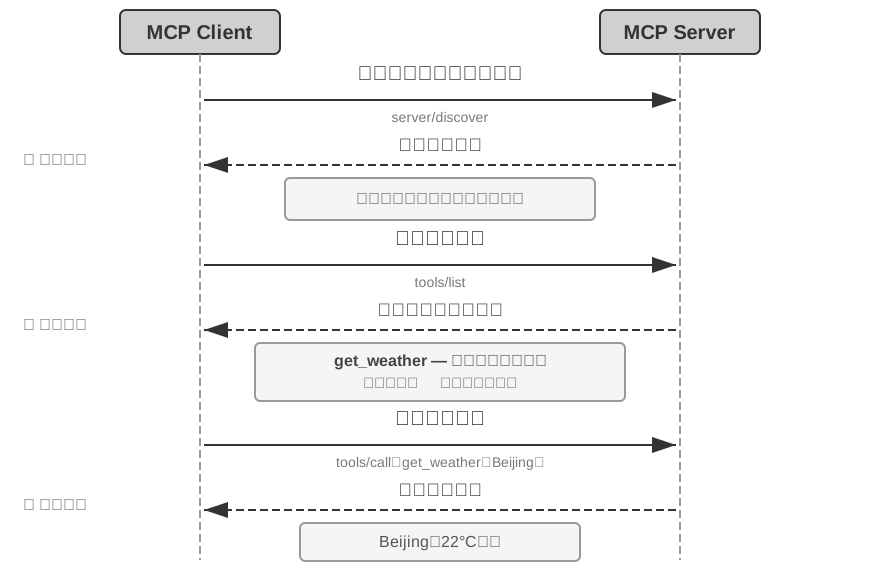


<svg xmlns="http://www.w3.org/2000/svg" viewBox="0 40 880 580" width="880" height="580">
|
||
<defs>
|
||
<marker id="ah" markerWidth="12" markerHeight="8" refX="12" refY="4" orient="auto">
|
||
<polygon points="0 0, 12 4, 0 8" fill="#333333"/>
|
||
</marker>
|
||
</defs>
|
||
<rect x="0" y="40" width="880" height="580" fill="#ffffff"/>
|
||
|
||
<rect x="120" y="50" width="160" height="44" rx="6" fill="#d0d0d0" stroke="#333333" stroke-width="2"/>
|
||
<text x="200" y="72" font-family="Arial, 'PingFang SC', 'Microsoft YaHei', sans-serif" font-size="20" fill="#333333" text-anchor="middle" dominant-baseline="central" font-weight="bold">MCP Client</text>
|
||
<rect x="600" y="50" width="160" height="44" rx="6" fill="#d0d0d0" stroke="#333333" stroke-width="2"/>
|
||
<text x="680" y="72" font-family="Arial, 'PingFang SC', 'Microsoft YaHei', sans-serif" font-size="20" fill="#333333" text-anchor="middle" dominant-baseline="central" font-weight="bold">MCP Server</text>
|
||
<line x1="200" y1="94" x2="200" y2="600" stroke="#999999" stroke-width="2" stroke-dasharray="8,4"/>
|
||
<line x1="680" y1="94" x2="680" y2="600" stroke="#999999" stroke-width="2" stroke-dasharray="8,4"/>
|
||
|
||
<line x1="204" y1="140" x2="676" y2="140" stroke="#333333" stroke-width="2" marker-end="url(#ah)"/>
|
||
<text x="440" y="120" font-family="Arial, 'PingFang SC', 'Microsoft YaHei', sans-serif" font-size="20" fill="#333333" text-anchor="middle" font-weight="bold">发现服务器能力(可选)</text>
|
||
<text x="440" y="162" font-family="Arial, 'PingFang SC', 'Microsoft YaHei', sans-serif" font-size="14" fill="#777777" text-anchor="middle">server/discover</text>
|
||
<line x1="676" y1="205" x2="204" y2="205" stroke="#333333" stroke-width="2" stroke-dasharray="8,4" marker-end="url(#ah)"/>
|
||
<text x="440" y="191" font-family="Arial, 'PingFang SC', 'Microsoft YaHei', sans-serif" font-size="18" fill="#333333" text-anchor="middle" font-weight="bold">返回能力说明</text>
|
||
<rect x="285" y="218" width="310" height="42" rx="5" fill="#f5f5f5" stroke="#999999" stroke-width="2"/>
|
||
<text x="440" y="244" font-family="Arial, 'PingFang SC', 'Microsoft YaHei', sans-serif" font-size="16" fill="#555555" text-anchor="middle">服务器支持哪些能力、如何交互</text>
|
||
|
||
<line x1="204" y1="305" x2="676" y2="305" stroke="#333333" stroke-width="2" marker-end="url(#ah)"/>
|
||
<text x="440" y="285" font-family="Arial, 'PingFang SC', 'Microsoft YaHei', sans-serif" font-size="20" fill="#333333" text-anchor="middle" font-weight="bold">获取工具清单</text>
|
||
<text x="440" y="327" font-family="Arial, 'PingFang SC', 'Microsoft YaHei', sans-serif" font-size="14" fill="#777777" text-anchor="middle">tools/list</text>
|
||
<line x1="676" y1="370" x2="204" y2="370" stroke="#333333" stroke-width="2" stroke-dasharray="8,4" marker-end="url(#ah)"/>
|
||
<text x="440" y="356" font-family="Arial, 'PingFang SC', 'Microsoft YaHei', sans-serif" font-size="18" fill="#333333" text-anchor="middle" font-weight="bold">返回标准化工具定义</text>
|
||
<rect x="255" y="383" width="370" height="58" rx="5" fill="#f5f5f5" stroke="#999999" stroke-width="2"/>
|
||
<text x="440" y="406" font-family="Arial, 'PingFang SC', 'Microsoft YaHei', sans-serif" font-size="16" fill="#444444" text-anchor="middle" font-weight="bold">get_weather — 查询指定城市天气</text>
|
||
<text x="440" y="428" font-family="Arial, 'PingFang SC', 'Microsoft YaHei', sans-serif" font-size="15" fill="#666666" text-anchor="middle">输入:城市 输出:天气信息</text>
|
||
|
||
<line x1="204" y1="485" x2="676" y2="485" stroke="#333333" stroke-width="2" marker-end="url(#ah)"/>
|
||
<text x="440" y="465" font-family="Arial, 'PingFang SC', 'Microsoft YaHei', sans-serif" font-size="20" fill="#333333" text-anchor="middle" font-weight="bold">调用选定工具</text>
|
||
<text x="440" y="507" font-family="Arial, 'PingFang SC', 'Microsoft YaHei', sans-serif" font-size="14" fill="#777777" text-anchor="middle">tools/call:get_weather(Beijing)</text>
|
||
<line x1="676" y1="550" x2="204" y2="550" stroke="#333333" stroke-width="2" stroke-dasharray="8,4" marker-end="url(#ah)"/>
|
||
<text x="440" y="536" font-family="Arial, 'PingFang SC', 'Microsoft YaHei', sans-serif" font-size="18" fill="#333333" text-anchor="middle" font-weight="bold">返回工具结果</text>
|
||
<rect x="300" y="563" width="280" height="38" rx="5" fill="#f5f5f5" stroke="#999999" stroke-width="2"/>
|
||
<text x="440" y="587" font-family="Arial, 'PingFang SC', 'Microsoft YaHei', sans-serif" font-size="16" fill="#555555" text-anchor="middle">Beijing:22°C,晴</text>
|
||
|
||
<text x="55" y="205" font-family="Arial, 'PingFang SC', 'Microsoft YaHei', sans-serif" font-size="16" fill="#666666" text-anchor="middle" font-weight="bold">① 能力发现</text>
|
||
<text x="55" y="370" font-family="Arial, 'PingFang SC', 'Microsoft YaHei', sans-serif" font-size="16" fill="#666666" text-anchor="middle" font-weight="bold">② 工具发现</text>
|
||
<text x="55" y="550" font-family="Arial, 'PingFang SC', 'Microsoft YaHei', sans-serif" font-size="16" fill="#666666" text-anchor="middle" font-weight="bold">③ 工具调用</text>
|
||
</svg>
|